Languages and Localization
Choose the language used by your hosted Kurrier workspace.
Languages and Localization
Kurrier can display its interface in multiple languages. Your selection changes translated navigation, buttons, form labels, and other interface text. It does not translate email messages, contacts, filenames, or workspace names.
Change your language
- Sign in to your Kurrier workspace.
- Open the language selector in the application.
- Choose the language you prefer. Reload the page if any screen still shows the previous language.
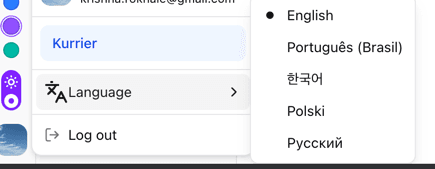
The available languages depend on the current hosted release. Some provider names and text entered by other people may remain in their original language.
Missing or incorrect translations
If you notice a label in the wrong language, contact Kurrier Support. Include the language, the page where it appears, and the text you expected. A screenshot helps us locate the string; leave private email content out of it.
Kurrier's open-source interface translations also accept GitHub pull requests if you would like to contribute a correction upstream.